
OEM Style Dash Cam vs Universal Dash Cam: Why Vehicle-Specific Cameras Are Better in 2026
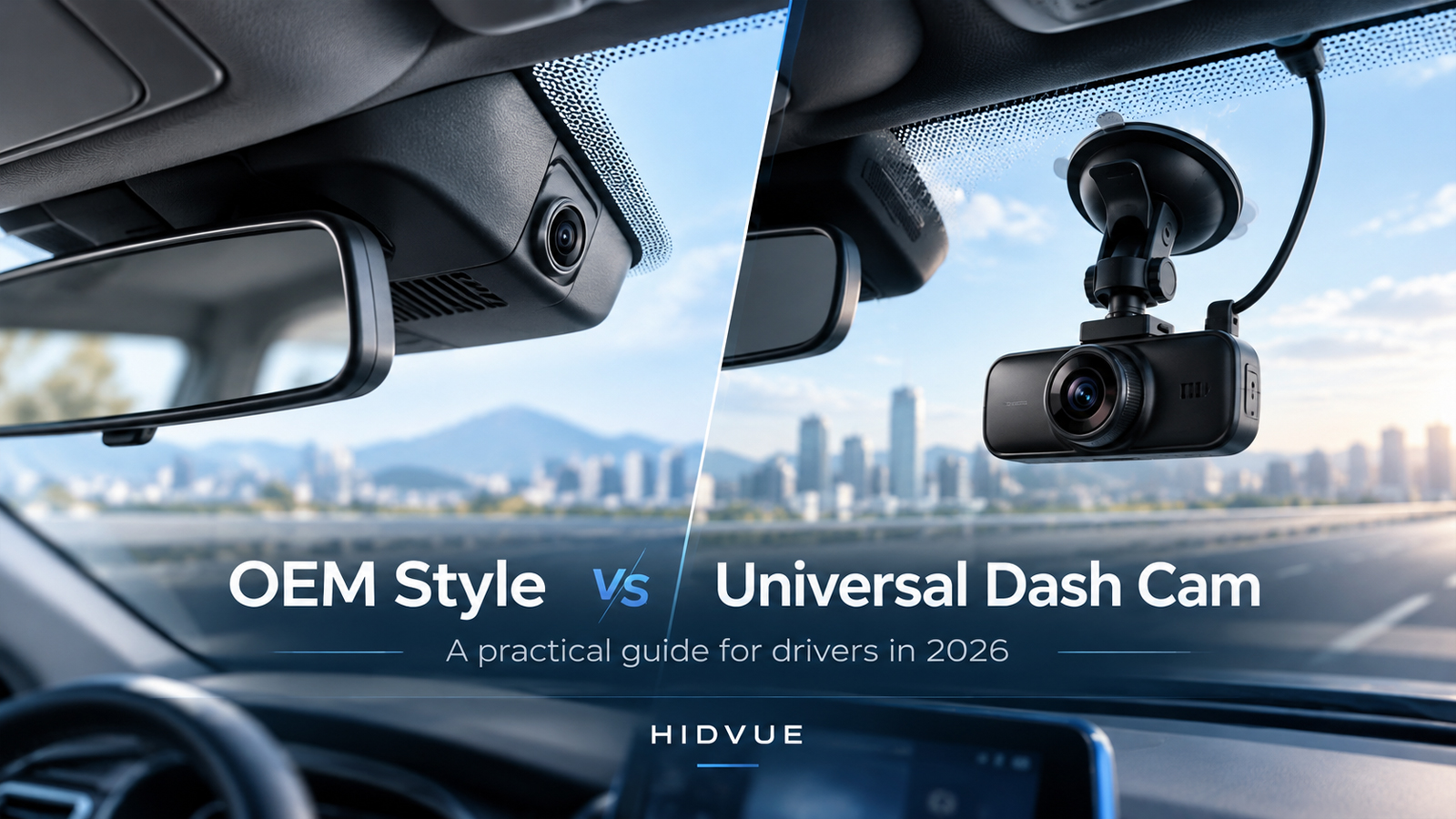
Choosing a dash cam is not just about resolution. Where it sits, how it draws power, whether the cables can be hidden, and how well it fits your vehicle all affect the everyday experience.
Two popular approaches are OEM-style, vehicle-specific dash cams and universal dash cams. Both can record useful footage, but they solve different problems. This guide explains the differences, the practical trade-offs, and what to check before you buy.
What Is an OEM-Style Dash Cam?
An OEM-style dash cam is an aftermarket camera designed to complement the appearance of a vehicle's original interior. Many vehicle-specific designs fit around or replace part of the plastic cover near the rearview mirror, helping the camera look more integrated than a conventional windshield-mounted device.
The term OEM-style describes the design approach; it does not mean the product was manufactured, supplied, or endorsed by your vehicle's manufacturer. Fitment depends on the exact vehicle model, model year, mirror housing, and sometimes the equipment package.
At HIDVUE, our focus is on vehicle-specific dash cams that blend discreetly with the cabin while providing practical recording features and guidance from product selection through installation.
What Is a Universal Dash Cam?
A universal dash cam is designed to work with many different vehicles. It normally attaches to the windshield using an adhesive mount or suction mount and receives power through an appropriate cable or power adapter.
Universal models can be a good choice if you frequently change vehicles, want to move the camera between cars, or prefer the flexibility of a standard mounting system. They are available across a wide range of prices and specifications. The trade-off is that the camera body, bracket, or power cable may be more noticeable inside the cabin.
OEM-Style vs. Universal Dash Cam: At a Glance
| Feature | OEM-Style, Vehicle-Specific Dash Cam | Universal Dash Cam |
|---|---|---|
| Vehicle fit | Designed for selected vehicle models and mirror housings | Designed for use across many vehicles |
| Appearance | Often blends into the rearview mirror area | Usually a visible windshield-mounted device |
| Mounting | Vehicle-specific housing and attachment method | Adhesive or suction mount, depending on model |
| Cable routing | May use a compatible factory-area power connection for a cleaner front installation | Usually needs a cable routed to a power source |
| Moving between cars | Typically limited by vehicle compatibility | Often easier to transfer |
| Front and rear recording | Available on selected models | Available on selected models |
| Installation | Requires checking vehicle fit and the correct power option | Requires choosing a safe mounting location and routing power |
| Video quality | Depends on the specific camera hardware and settings | Depends on the specific camera hardware and settings |
| Price | Often higher because of vehicle-specific housing and fitment | Wide range, from entry-level to premium |
The key distinction: OEM-style describes how a dash cam integrates with the vehicle. It does not automatically guarantee better video quality, more features, or easier installation in every car.
Five Reasons Drivers Consider a Vehicle-Specific Dash Cam
1. A Factory-Inspired Appearance
For drivers who care about the details of their cabin, appearance matters. A vehicle-specific housing can sit close to the existing mirror assembly and create a more cohesive look than a separate camera mounted elsewhere on the windshield.
This is particularly appealing in vehicles with carefully designed interiors, where an extra device or visible bracket may feel out of place.
2. Less Visible Equipment Around the Windshield
Depending on the vehicle and power arrangement, an OEM-style installation can reduce exposed wiring around the front camera. A tidy installation helps preserve the original look of the interior and keeps attention on the road rather than on added accessories.
The result still depends on how the product is installed. Rear-camera systems need additional wiring toward the back of the vehicle, even when the front camera uses a discreet housing.
3. A Design Built Around Specific Vehicles
Rather than relying on a one-size-fits-all mount, a vehicle-specific camera is matched to a particular mirror-cover shape and installation position. This can make the finished result look more intentional.
However, the same car name does not always mean the same mirror housing. Different model years, trims, sensor packages, and regional versions can use different covers. Compatibility must be verified before ordering.
4. Convenient Recording Options
Depending on the HIDVUE model, drivers can choose front-only recording or a front-and-rear setup. Some models also provide Wi-Fi connectivity for viewing and downloading footage through the Viidure app while the phone is near the camera.
Normal driving recording does not require your phone to remain connected to the camera's Wi-Fi. The connection is mainly for accessing footage and settings.
5. A Cleaner Starting Point for Installation
Certain vehicle-specific models can use a compatible rain-sensor or mirror-area power connection with the supplied cable. Other installations may use a suitable OBD power adapter or a hardwire solution.
That can simplify the visible front-cabin setup, but the correct option varies by car and product. Always confirm the power connector and instructions for your exact vehicle rather than assuming every installation is plug-and-play.
How Does Installation Compare?
Installing a Vehicle-Specific Dash Cam
The process depends on the vehicle, but a typical installation involves these steps:
- Confirm compatibility. Check the vehicle's model year, mirror-cover shape, and relevant connectors before purchase.
- Remove the appropriate trim carefully. Follow a vehicle-specific guide to avoid damaging clips or interfering with sensors.
- Connect the correct power cable. Use only the power solution recommended for the vehicle and camera configuration.
- Fit the camera housing. Check that the housing is secure and does not interfere with the mirror, sensors, or driver's view.
- Verify recording. Start the vehicle, confirm the camera powers on, and check its recording and Wi-Fi functions.
If you choose a front-and-rear package, the rear camera typically mounts inside the rear windshield and requires routing a cable from the front to the back. Some vehicles are more complex than others; professional installation is sensible whenever trim removal or wiring is unfamiliar.
Installing a Universal Dash Cam
A universal dash cam generally requires selecting a safe windshield location, attaching the mount, routing the power cable, and configuring the recording settings. It can be straightforward, but installation neatness depends on the mounting position and cable management.
Installation time is not a reliable way to rank the two styles. It varies with the car, power source, and whether a rear camera or parking-monitoring power kit is included.
Does OEM-Style Mean Better Video Quality?
Not necessarily. A camera's recording performance depends on its image sensor, lens, processor, resolution, exposure tuning, heat management, and recording settings—not simply on whether the housing looks factory-installed.
When comparing products, look at actual daytime and nighttime footage, readable detail in relevant conditions, recording stability, and the specifications of the exact model. A well-designed universal dash cam can outperform a poorly specified vehicle-specific camera, and the reverse can also be true.
HIDVUE focuses on combining discreet vehicle-specific design with practical recording technology. Review each product page for its exact front-camera resolution, rear-camera specification, and supported functions before choosing a model.
Power Supply and Parking Monitoring: What to Know
Power arrangements deserve special attention because they influence what the camera can do when the engine is off.
- Vehicle-area power connection: Certain compatible models use a connection near the mirror or rain sensor for normal driving recording.
- OBD power adapter: A compatible adapter may support parking recording, subject to vehicle compatibility, adapter settings, and battery-voltage protection.
- Hardwire connection: Some installations use a suitable ACC/constant-power connection for parking-monitoring functions.
On supported HIDVUE configurations, parking monitoring can use time-lapse recording while the vehicle is parked. This is different from motion-triggered recording, and HIDVUE's current parking mode should not be described as motion detection.
Any camera that records while the vehicle is off consumes electrical power. Where a compatible power adapter includes low-voltage protection, it can reduce the risk of excessive battery discharge, but the protection setting and battery condition still matter. Check the relevant product instructions before enabling parking recording.
Which Type of Dash Cam Should You Choose?
Choose an OEM-style, vehicle-specific dash cam if:
- You want a discreet, factory-inspired appearance.
- You prefer a camera designed around your vehicle's mirror area.
- You are happy to verify the exact fit before ordering.
- You value a clean installation and vehicle-specific guidance.
Choose a universal dash cam if:
- You expect to move one camera between several cars.
- You need broader fitment without a dedicated housing.
- You want more freedom in camera placement.
- Your priority is a particular price or specification rather than an integrated appearance.
Neither format is the best choice for every driver. The better camera is the one that fits your vehicle, meets your recording needs, and can be installed safely and reliably.
How to Check HIDVUE Compatibility Before Buying
Before ordering a HIDVUE vehicle-specific dash cam, confirm the following:
- Make, model, and model year. Include the vehicle generation or trim where relevant.
- Rearview mirror housing. Compare the shape of the original plastic cover with the product listing.
- Power connector. Confirm that the intended power solution is supported by your vehicle configuration.
- Recording preference. Decide whether you need front-only or front-and-rear coverage.
If you are unsure, contact HIDVUE Support with your vehicle details and clear photos showing both sides of the rearview mirror housing. Our team can help check the available options before you place an order.
Frequently Asked Questions
Is an OEM-style dash cam an official factory camera?
No. OEM-style usually refers to a factory-inspired appearance or fitment approach. It should not be taken to mean that the vehicle manufacturer made or endorsed the camera.
Is an OEM-style dash cam always plug-and-play?
No. Some compatible vehicles allow a convenient power connection near the mirror, while others need an OBD adapter or another suitable power solution. Rear-camera installation also requires additional cable routing.
Can I install a vehicle-specific dash cam myself?
Many drivers can follow a suitable vehicle-specific installation guide. However, the difficulty depends on the vehicle's trim, connectors, and camera configuration. Use a professional installer if you are not comfortable working around vehicle electronics or interior panels.
Can I add a rear camera?
Front-and-rear recording is available for selected HIDVUE products. Upgrade compatibility depends on the specific hardware version; do not assume every front-only camera can be upgraded later. Check the product listing before purchasing.
Can a HIDVUE dash cam record while the car is parked?
Supported models can provide parking time-lapse recording when connected to a compatible parking-power solution and correctly configured. Availability and behavior depend on the model and installation. Do not confuse time-lapse recording with motion detection.
Do I need to keep my phone connected to the camera's Wi-Fi?
No. Once powered and configured, the dash cam records to its memory card without a continuous phone connection. Connect to the camera's local Wi-Fi when you want to use the Viidure app to review recordings or change settings. Local Wi-Fi is not remote internet access.
How do I know which HIDVUE camera fits my car?
Start with the vehicle make, model, and year listed on the product page. Because mirror covers can vary, photos of the original rearview mirror housing are often the best way to confirm fitment. Contact our support team if anything looks different from the listing.
Final Thoughts: Choose the Design That Fits Your Needs
An OEM-style dash cam offers an appealing option for drivers who prefer a discreet, vehicle-specific installation. A universal dash cam offers flexibility and a wide selection of mounting and pricing options. Both can provide effective recording when the hardware and installation are right.
At HIDVUE, we specialize in vehicle-specific, OEM-inspired dash cams and practical support from compatibility checks to installation guidance. Our aim is simple: help you find a camera that feels at home in your vehicle and works for the way you drive.
Explore HIDVUE Dash Cams by Vehicle — browse compatible models for your car.
Not Sure About Fitment? Contact HIDVUE Support — send your vehicle details and mirror photos for assistance.